
Research
To deposit documents in OpenCUNEF, you must be a member of faculty at CUNEF Universidad, be registered with your institutional email account (@cunef.edu) and have the necessary permissions. The self-deposit process enables authors to deposit their own work.
Education
Final Degree Projects and Final Dissertations will be deposited by Library staff, provided that the author gives permission and that the project has been confirmed as satisfactory by the evaluation committee and approved to become part of the University’s bibliographic collection.
Key steps for self-deposit
Option A
1. Log in to the repository by entering your personal data (email and password). If this is the first time you log in, you must register as a new user.
2. Once in “My OpenCUNEF“, you can start the OpenCUNEF document upload process.
To start a new upload, go to “Envíos” (Uploads), drag and drop the file you wish to deposit into the box and click on the “+” button to the right of the box.

3. Find (directly or using the search box) the collection where you want to deposit the new item, and select it.
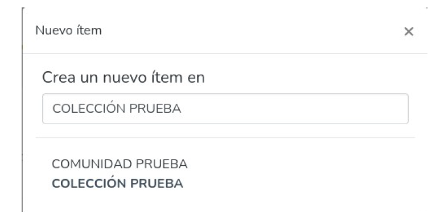
4. When you select the collection, a form with several fields will pop up on the screen. Fields with an asterisk are required, the rest are optional. This form will vary depending on the type of document you are depositing.
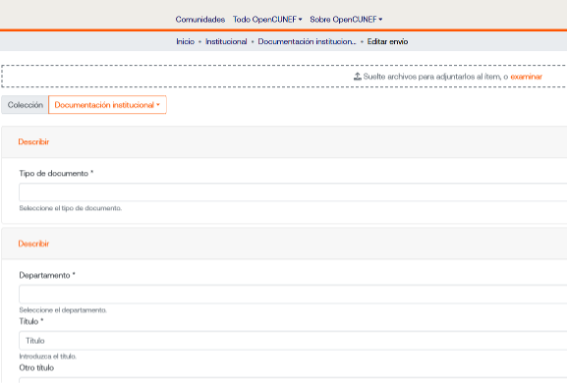
5. To finalise the upload, you must fill in all the fields that are marked with an asterisk. If you attempt to confirm the deposit without having completed all the mandatory fields, a warning will pop up on the screen, and the required fields will be marked in red.
Once all the required fields are completed, you may upload/deposit the item by clicking on “+ Depositar”.

6. Once the process is finalised, the item will be reviewed by the staff of CUNEF Universidad. The data will be checked and modified (if necessary) and the item will be published in the repository.
Option B:
1. In the sidebar on the left of the screen, click on “+ Nuevo” and then on “Item”.

2. In the “Nuevo ítem” (New item) window, find (directly or using the search box) the collection where you want to deposit the new item, and select it.
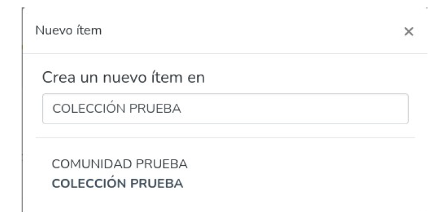
3. When you select the collection, a form with several fields will pop up on the screen. Fields with an asterisk are required, the rest are optional. This form will vary depending on the type of document you are depositing.
4. To finalise the upload, you must fill in all the fields that are marked with an asterisk. If you attempt to confirm the deposit without having completed all the mandatory fields, a warning will pop up on the screen, and the required fields will be marked in red.
Once all the required fields are completed, you may upload/deposit the item by clicking on “+ Depositar”.

5. Once the process is finalised, the item will be reviewed by the staff of CUNEF Universidad. The data will be checked and modified (if necessary) and the item will be published in the repository.
Important Notice:
1.- Before you upload an item, please check to make sure that it has not already been deposited in OpenCUNEF, to avoid duplicating it.
2.- Please check the copyright policies before uploading an item, since they will determine what version to upload to the repository (see Policies and Licenses)